January 14, 2026
Nearby folders
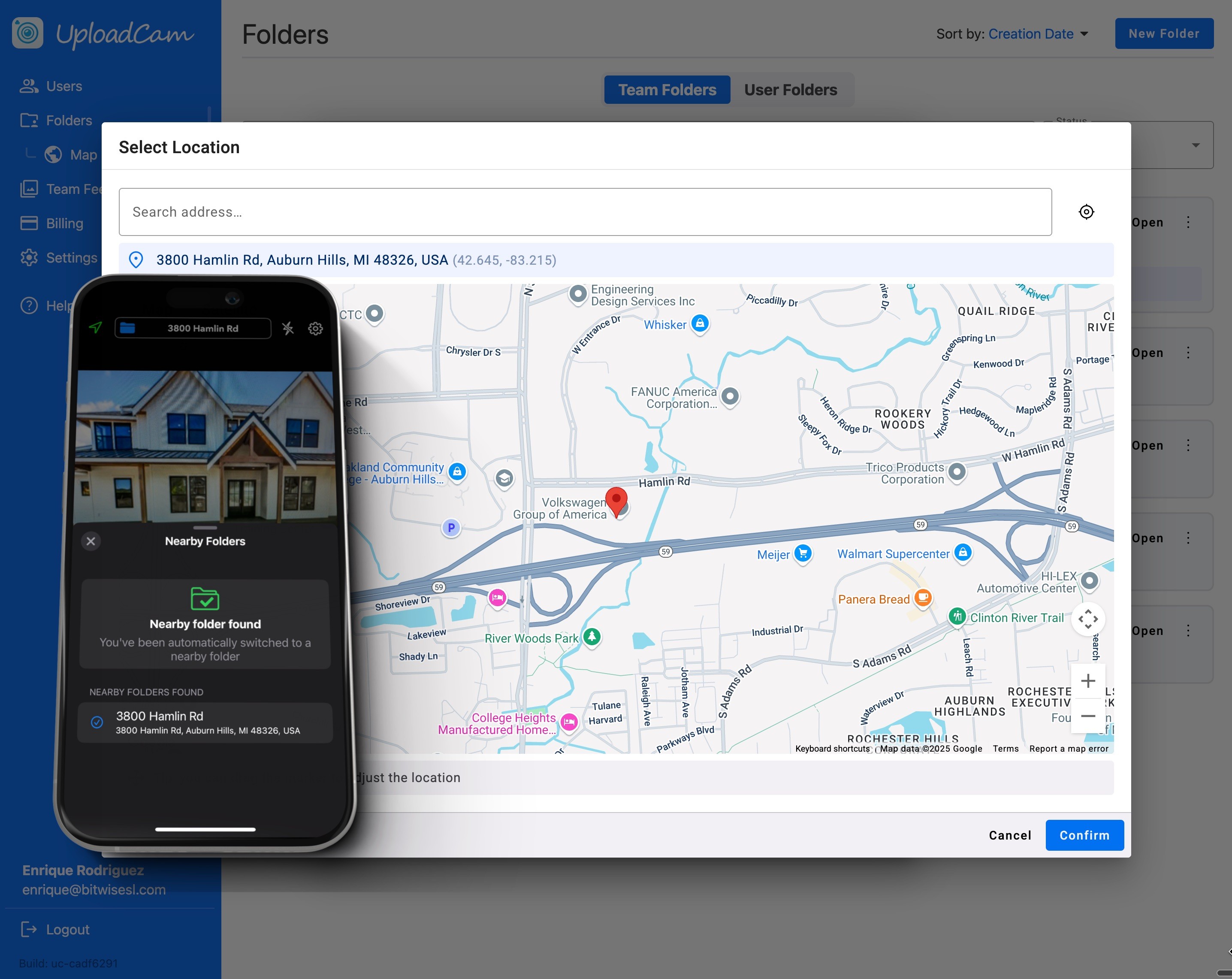
Nearby Folders let you associate a GPS location with a folder. When you arrive at that location, UploadCam can automatically switch to the correct folder—or prompt you to do so—so your photos always end up in the right place.
For individual users
Individual users can set up Nearby Folders when creating a new folder. You can associate the folder with your current location, or selecting any point in a map inside of the app.
When you arrive at that location later, UploadCam automatically switches to the right folder or asks if you’d like to switch. It’s ideal for freelancers, inspectors, or anyone who regularly works at the same locations and wants zero friction when taking photos.
For Teams
For teams, Nearby Folders are configured in the admin panel. An admin can link team folders to specific GPS locations, making it easy for everyone to upload photos to the correct folder when arriving on-site.
This is especially useful for construction, field services, real estate, and any company working across multiple locations.
Nearby Folders help ensure the right photos go to the right folder—automatically.
Less manual work, fewer mistakes, and cleaner organization for individuals and teams alike.